


How to prepare for a video or online interview
By Ziad Maltiti · Updated 5 October 2026

Many interviews now happen over video, including first-round scholarship interviews and calls with prospective supervisors. The questions are the same as in person, but the format changes how you come across, and small technical or presentation problems can pull attention away from good answers. Most of this can be dealt with beforehand.
Technology
A technical scramble at the start of the call is the quickest way to unsettle yourself. Work through this list a few days before, not on the morning:
- Test your device, camera and microphone with a trial call to a friend on the same platform the interviewers will use
- Install or update the app, and check that you can join from the link in the invitation
- Check your internet; use a wired connection if you can, and close other apps that use bandwidth
- Learn the controls: joining, muting, turning the camera on and off, and sharing your screen if you might need to
- Use headphones or earphones with a microphone if your laptop's speakers cause an echo
- Charge the laptop and keep the charger plugged in during the call
- Save a phone number or email for the organiser, and keep mobile data available as a backup connection
Ask anyone you live with not to stream video or start large downloads during the interview, and put your phone on silent, out of reach.
The room
The interviewer can see what is behind you, so choose a quiet, tidy spot with a plain or uncluttered background. Sit facing a window or lamp so your face is lit, and avoid having a bright window behind you, which leaves you in shadow. Raise the camera to roughly eye level so you are not looking down into it.
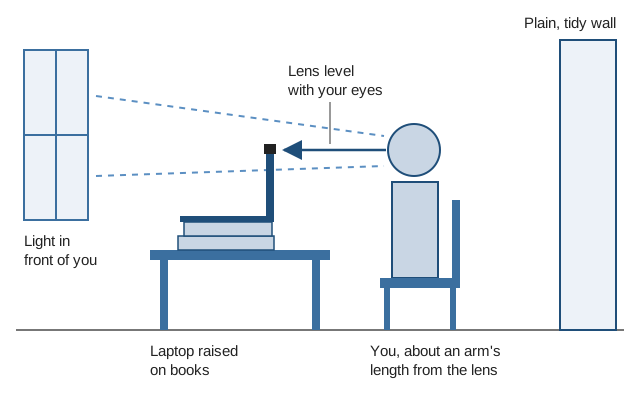
Sit far enough back that your head and shoulders fill the frame, with a little space above your head. Too close and every movement looks large; too far and the interviewer loses your expressions. If the only quiet place has a busy background, a blank wall a metre or two behind you looks better than a blurred or virtual background, which can flicker around your head and arms when you move.
Shared housing, a hostel room or a family home can make a quiet space hard to find. If that is your situation, it is reasonable to ask a library, a university careers office or an employer whether you can book a small room for an hour. Test the connection there first.
Eye contact and body language
On video, looking at the person on your screen means looking away from the camera. To seem engaged, look into the lens while you are speaking, and try not to watch your own image. Many platforms let you hide your self-view once you have checked how you look, which removes the temptation. Moving the interviewer’s window to the top of the screen, just below the camera, also helps.
Sit up, keep an open posture and let your expressions show. Energy comes across flatter through a screen, so a little more warmth than usual helps. Nod and smile when the interviewer is speaking; on a small screen, those cues replace the small sounds people make to show they are listening.
Delays and pauses
Video calls have small delays, which makes it easy to talk over each other. Leave a brief pause before answering to be sure the interviewer has finished. If the line lags and you miss part of a question, ask for it to be repeated; interviewers expect this.
Do not panic or wait. Rejoin from the same link straight away. If that fails within a minute or two, email or phone the organiser to say what happened and that you are trying again. When you are back, pick up calmly: "Sorry about that. I was saying..." Dropped connections are a normal hazard of video calls, and how you handle one says more about you than the interruption does.
Preparing what you will say
The preparation is the same as for any interview. Research the role, the programme or the funder, think through the questions you are likely to be asked, and have a few questions of your own. For scholarship panels, our guide on preparing for a scholarship panel interview lists the questions that come up most.
You can keep brief notes just out of shot and glance at them, but reading from a script is obvious on camera and sounds stiff. A few keywords on a sticky note beside the camera work better than a page of text, because glancing at them keeps your eyes near the lens.
A full rehearsal

Run a complete practice on the platform you will be using, ideally with someone asking you questions. It settles the technical side, shows you how you look and sound on camera, and makes the format familiar enough that you stop noticing it on the day.
Ask your practice partner to record the call if the platform allows it. Watching ten minutes back shows you things nobody will mention: a light that leaves half your face in shadow, a habit of looking down at your own image, a fan humming in the background. Fix those, and on the day log in ten minutes early, check your camera and sound one last time, and wait. If anxiety is the larger problem than the technology, see how to handle interview nerves.